
Billing is one of the most sensitive workflows in senior living
Paper statements arrive days late, follow-up means someone manually working through a list, and every missed payment becomes a conversation nobody wanted to have. That's how billing becomes a source of friction for families and lost time for business offices, instead of running quietly in the background.
Without a unified billing and payment system
- Families limited to paper checks or phone-based payment processing face friction that delays collections.
- Statements are mailed and arrive days after the billing period closes, prompting calls that should be unnecessary.
- Collections follow-up requires manual staff outreach for every family not enrolled in automatic payment.
- Payment reconciliation requires manual matching between the payment system and the EHR billing record.
- Business office staff answer repetitive billing questions that self-service portal access would resolve automatically.
With Carefeed eBilling & Payments
- Families pay through ACH, eCheck, debit, or credit card from any device at any time through a community-branded portal.
- Digital statements are delivered the moment they are available through text, email, or portal notification.
- Automated reminder workflows run on a configured schedule without staff initiation for every billing cycle.
- Payments post directly to resident accounts in PointClickCare through a daily reconciliation workflow.
- Families access current balances, payment history, and statements through the Family Portal without calling the business office.
Proven Outcomes
What our communities are saying
85%
Of communities save 10 or more hours per week.
Time recovered from manual payment follow-up and billing tasks.
77%
Report a reduction in inbound status calls.
Families finding answers in the portal instead of calling in.
88%
Report faster month-end close activities since adopting Carefeed.
1 in 5
Organizations estimate $100k or more in annual savings.
Through software consolidation and recovered staff time.
Data from a 185-community survey of Carefeed customers.
The eBilling & Payments workflow
Payments, statements, and reminders. All in one place.
Online Payments & the Family-Facing Portal
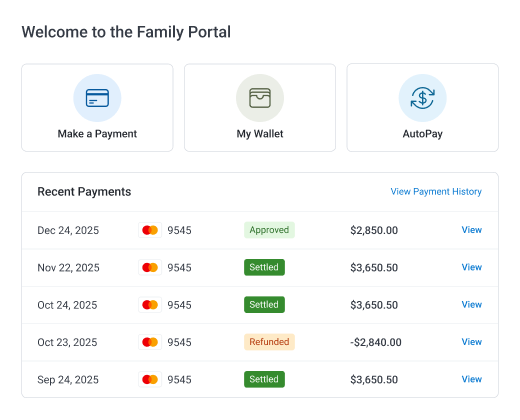
Families, and administrators on their behalf, make payments through a secure, community-branded portal accepting ACH, eCheck, debit card, and credit card. The portal home screen presents Make a Payment, My Wallet, AutoPay, and eBilling alongside recent statements and payment history. Status indicators are clear: Approved, Settled, Refunded.
Payments post directly to resident accounts in PointClickCare through a daily reconciliation workflow with staff review before posting.
AutoPay Enrollment & My Wallet
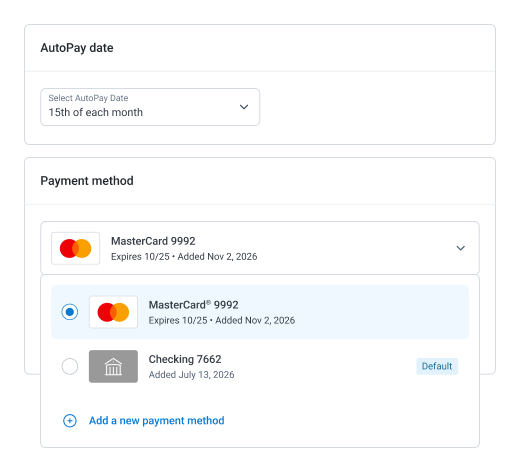
Families enroll in AutoPay directly through the portal, choosing between a fixed monthly amount or full statement balance and selecting their preferred payment method. No phone call to the business office required. My Wallet stores payment methods securely for both AutoPay and one-time payments.
Business office teams have clear visibility into AutoPay enrollment status across the resident population. Every family enrolled in AutoPay is one less manual follow-up per billing cycle.
eBilling & Digital Statement Delivery
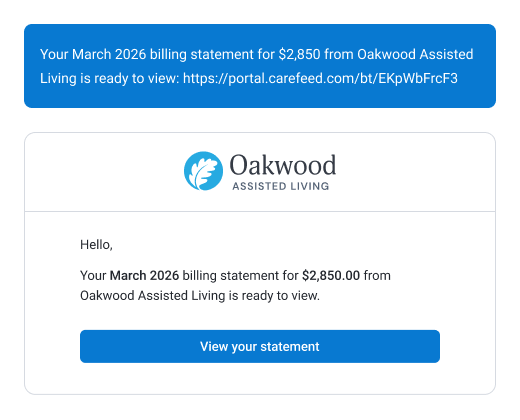
When a new statement is available, Carefeed notifies families automatically through the same text, email, or portal channels they already use for community updates, with a direct link to view and pay in one step.
Paper statements arrive days after the billing period closes. Digital delivery reaches families immediately, shortening the gap between billing cycle close and payment.
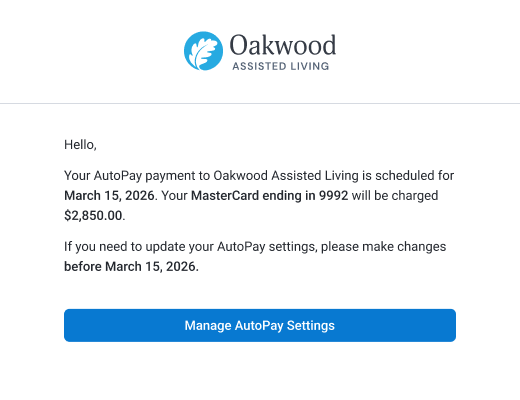
Automated Billing Reminders
Payment due notifications, pre-due reminders, and past-due escalations run automatically on a configured schedule and deliver through each family's preferred channel with a direct link to complete payment.
Business office teams spend less time on routine outreach and more time on the accounts that genuinely need a phone call.
The Action Queue
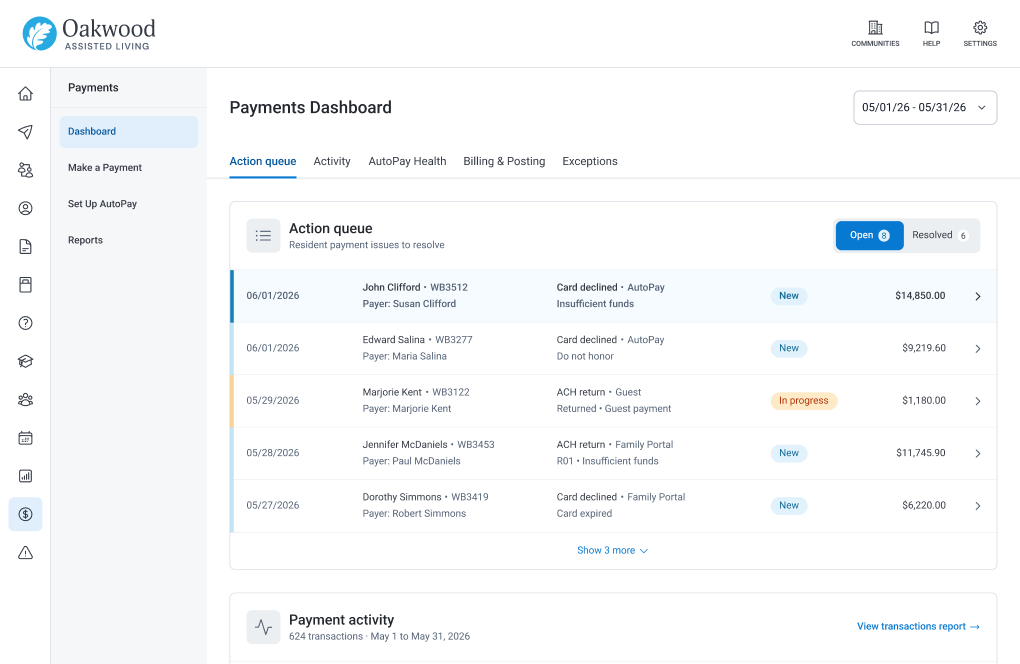
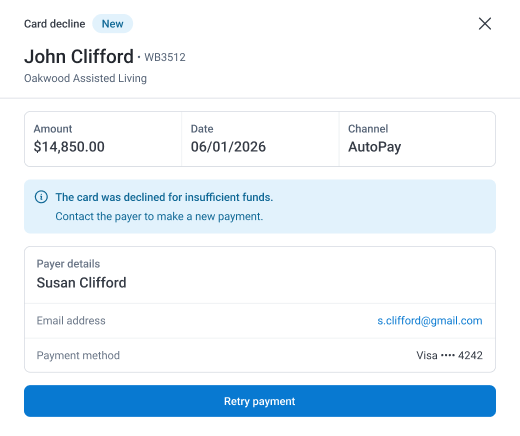
When a payment fails, whether a card is declined or a bank transfer is returned, the Action Queue brings it to your team's attention immediately, in plain language. Forty-six different bank and processor codes are translated into a handful of clear messages. Staff always know exactly what happened and exactly what to do next, instead of decoding a return code or checking a separate processor dashboard.
An expired card or a closed bank account is removed from the family's wallet automatically. When a replacement payment succeeds, the queue item closes itself. New billing staff don't need to memorize bank codes to know how to help a family get back on track.
Every role that touches billing and payments has something to gain here
Business Office Directors & Billing Managers
Replace the monthly payment follow-up cycle with automated workflows that run on their own. Business office time goes to the financial work that actually needs a person, not repetitive outreach.
AR Teams & CFOs
Improve collections velocity by offering electronic payment options that match how families prefer to pay. Use AutoPay enrollment growth and electronic payment volume to build more accurate cash flow forecasts.
Executive Directors
Give families a payment experience that matches the quality of care your community provides, since billing is one of the few places they interact directly with the business office.
COOs and Regional Operators
Standardize billing communication and payment collection across every community. One automated system replaces manual processes that vary from building to building.
Residents & Families
Pay through the method that works best, at any time, from any device. Access current balances, statements, and payment history from the same portal used for all other community information.
Billing and payment questions
What does the eBilling & Payments suite include?
The suite covers online payments, AutoPay enrollment, My Wallet, eBilling and digital statement delivery, automated billing reminders, and the Action Queue for resolving payment failures. Together they connect every stage of the billing and payment process for families and business office teams.
What payment methods does Carefeed accept?
Carefeed accepts ACH bank transfers, eCheck, debit card, and credit card. Families choose the method that works best for them. Stored payment methods in My Wallet make repeat transactions faster.
Is the payment portal PCI-DSS certified?
Yes. Carefeed's payment infrastructure is PCI-DSS certified, meeting the security standards required for electronic payment processing in healthcare environments.
How does payment reconciliation to PointClickCare work?
Payments processed through Carefeed post directly to resident accounts in PointClickCare through a daily reconciliation workflow that includes staff review before posting. This automates the reconciliation step while maintaining accuracy and oversight.
What is AutoPay and how do families enroll?
AutoPay allows families to schedule recurring automatic payments for either a fixed amount or the full statement balance. Families enroll directly through the Family Portal without contacting the business office. Enrollment, payment method management, and cancellation are all self-service.
Can families access billing history in the portal?
Yes. Families access current and historical statements, account balances, and payment history with status indicators (Approved, Settled, Refunded) directly through the portal from any device at any time.
How do automated reminders work?
Carefeed delivers payment due notifications, pre-due reminders, and past-due escalations automatically based on a configured schedule. Reminders go through each family's preferred channel and include a direct link to complete payment.
What happens when a payment fails?
When a payment fails, the community is notified immediately, and the failure is consolidated into a single Action Queue with a plain-language explanation of what happened and clear guidance on what to do next. An expired card or a closed bank account is removed from the family's wallet automatically, and the queue item closes on its own once a replacement payment succeeds.
Does this work for multi-site billing operations?
Yes. Portfolio-level payment reporting gives business office managers and CFOs visibility into payment activity, AutoPay enrollment, and AR performance across all communities, supporting portfolio-level financial oversight.
Get Started
A billing process that runs without anyone having to start it
Digital statements reach families immediately. AutoPay handles recurring collections automatically, and reminders run on schedule without manual initiation. The billing cycle runs on its own, every cycle, without anyone needing to kick it off. Whatever you start with, you're supported by a dedicated Customer Experience team from day one.